
Finding leads
Intent signals explained
Every buying signal Find Leads can look for, the free public source behind each one, how long it counts, and how to combine signals
7 min readUpdated 27 September 2026
A buying signal is something a company did recently that suggests it may be ready to buy: it raised money, appointed a new Head of Growth, opened an office or started hiring marketers. Find Leads looks for these signals in free, public sources and shows you the evidence for each one.
ClientTurn does not scrape LinkedIn and does not buy intent data from vendors. Every signal comes from one of these places:
| Source | What it is |
|---|---|
| Companies House | The official register: officers, filings and the company profile. Needs a free Companies House API key |
| Company website | The company's own news, press, blog and about pages |
| Company careers page | The company's own careers and jobs pages |
| Your CRM or list | Data you already hold, such as a contract renewal date |
| Google Places | A business listing. It can confirm a location exists but cannot say when it opened, so it only supports another signal |
Choose signals for a search
- Step 1: Open a search session in Find Leads and choose the Signals row of the plan.
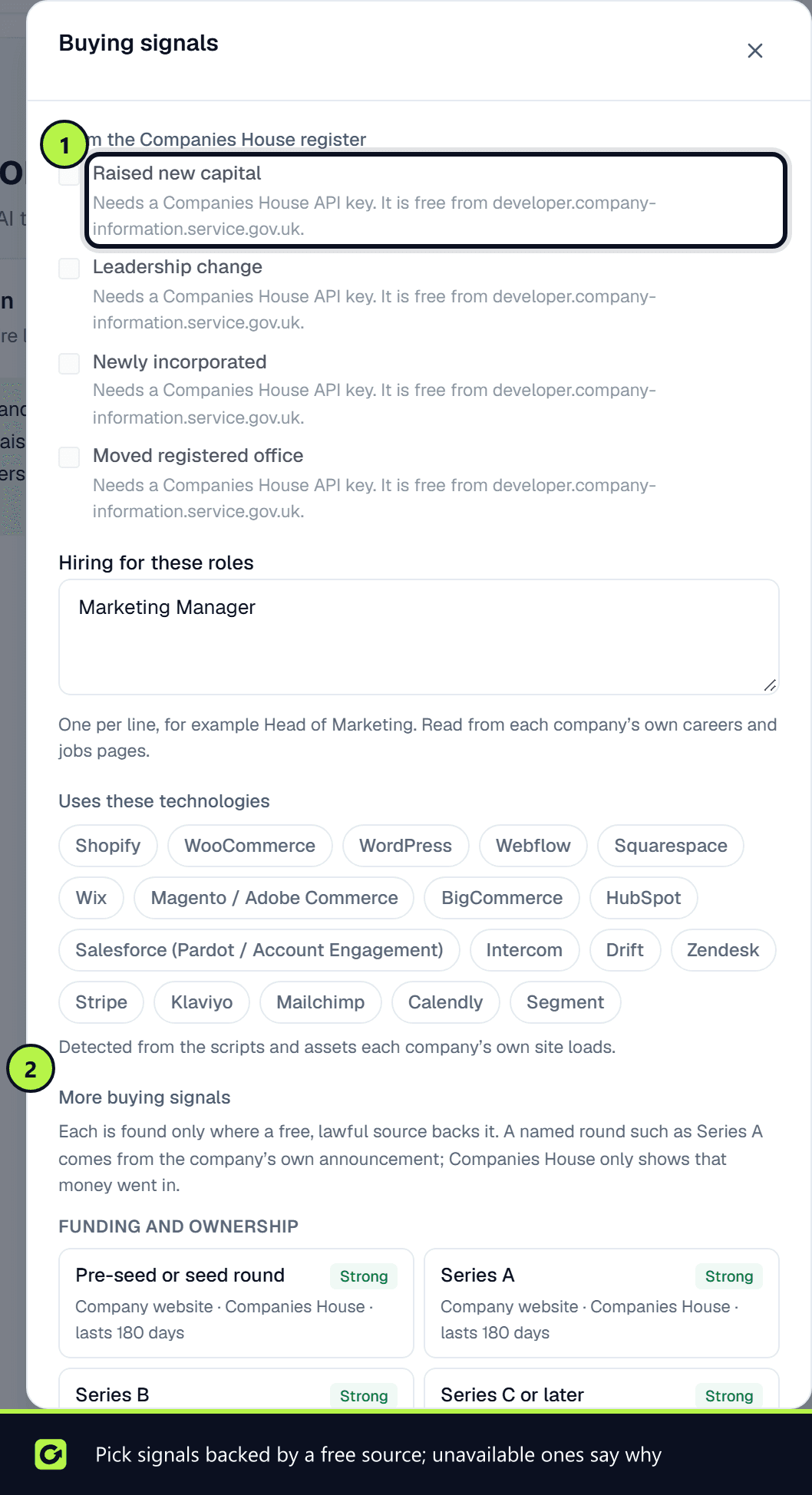
- Step 2: Under More buying signals, pick the signals you want. They are grouped as funding, people, hiring, growth, technology, and events.
- Step 3: For hiring and appointments, you can limit them to roles in certain functions, such as Marketing and growth. Leave this empty to accept any function.
- Step 4: Choose Save. Nothing is spent until you start a sourcing run.
Each signal shows its sources, how strong the evidence is and how many days it counts for. A signal that cannot run in your workspace is greyed out with the reason, for example "Needs a Companies House key". A signal that no free, lawful source can supply is still listed, marked Not available, with the reason.
Funding and ownership
| Signal | Source | What counts |
|---|---|---|
| Pre-seed or seed round, Series A, Series B, Series C or later | Company website | A news or press post announcing the round, with the amount where stated |
| Raised new capital | Companies House, company website | A share allotment (SH01), or a post saying the company has raised money without naming a round |
| Grant awarded | Company website | A post announcing a grant, such as an Innovate UK award |
| Debt or revenue-based finance | Companies House, company website | A charge registered (MR01), or a post announcing a debt facility |
| IPO or listing | Company website | A press release announcing admission to AIM, the Main Market or another exchange |
| Acquisition or merger | Company website, Companies House | A post announcing a deal, or a company notified as a person with significant control (PSC02) |
| New investor | Company website | "Round led by…" or "welcomes investment from…" |
People and hiring
| Signal | Source | What counts |
|---|---|---|
| New C-level hire, new VP, new Head of | Company website, Companies House | An appointment post, or a director appointed whose stated occupation is a senior title |
| Leadership change | Companies House | A director resigned and another was appointed in the same window |
| New director appointed | Companies House | A director or LLP member appointed. Founding directors do not count |
| Key departure | Companies House, company website | A director resignation, or a post saying a leader is stepping down |
| Team growth | Company website | A post welcoming several new starters |
| Hiring for a specific role | Company careers page | A role on the careers page, grouped by function |
| Hiring volume spike | Company careers page | Six or more open roles at once |
| First hire in a function | Company careers page | "Our first marketing hire", "founding engineer" and similar |
The function of a role tells you the likely need. Hiring a marketing manager suggests agency support while the role is filled. Hiring developers suggests a studio or contractors.
ClientTurn keeps the role and the date, never the person's name. For an appointment post, the evidence reads like "Welcomes … as Chief Technology Officer", with a link to the page.
Growth, technology and events
| Signal | Source | What counts |
|---|---|---|
| New office or relocation | Company website | "Opened a new office in Leeds" and similar |
| Expansion into a new region | Company website | "Expanding into the US" and similar |
| Headcount growth | Company website | "We've grown to 80 people", "doubled our team" |
| New product launch | Company website | "We're excited to launch…", "now generally available" |
| Rebrand or change of name | Company website, Companies House | A post about a new brand, or a change of name filed at Companies House |
| Website relaunch | Company website | "Welcome to our new website" and similar |
| Award or accreditation | Company website | A win, a shortlisting, or an accreditation such as ISO 27001, Cyber Essentials or B Corp |
| New partnership | Company website | "Partners with…", "announces a partnership" |
| Uses a technology you target | Company website | A script the vendor's own embed puts on the page |
| Adopted, removed or replaced a tool, outgrown a platform | Company website | "We've moved to HubSpot", "migrated from Magento to Shopify", "re-platforming" |
| Public website issue | Company website | No mobile viewport tag, scripts loaded over plain http, an outdated jQuery or WordPress version, or a footer copyright several years old |
| Tender or RFP published | Company website | An invitation to tender or request for proposal on the company's own site |
| Statutory filing deadline | Companies House | Accounts or confirmation statement due within 60 days, or overdue |
| Company anniversary | Companies House | A 1, 5, 10, 15, 20 or 25-year (and so on) anniversary of incorporation coming up |
| Accounts show growth | Companies House | The latest accounts are a larger type than before, for example micro-entity to small |
| Change of registered office | Companies House | An address change (AD01). Often just a new accountant, so it counts for less |
| Newly incorporated | Companies House | Incorporated recently |
A contract renewal window only comes from your own CRM or list, because nobody publishes their supplier contract dates.
Not available
These are listed so you know they were considered, not forgotten:
- A person changed jobs. Only professional networks know this, and ClientTurn does not scrape LinkedIn.
- Measured site speed. This needs a browser test of each site, which ClientTurn does not run.
- Visited your website. ClientTurn does not track visitors to your site.
- Researching a topic elsewhere. This only comes from paid intent vendors, which ClientTurn does not use.
How long a signal counts
Each signal counts for a set number of days after it happened, for example 45 days for a job posting and 180 days for a funding round. If your plan's How recent setting is shorter, the shorter one applies. Recent evidence counts for more than older evidence, and a signal outside its window does not count at all.
Evidence strength also differs. A Companies House filing counts for more than a website post, and a website post can never make a prospect an A on its own.
Combine signals
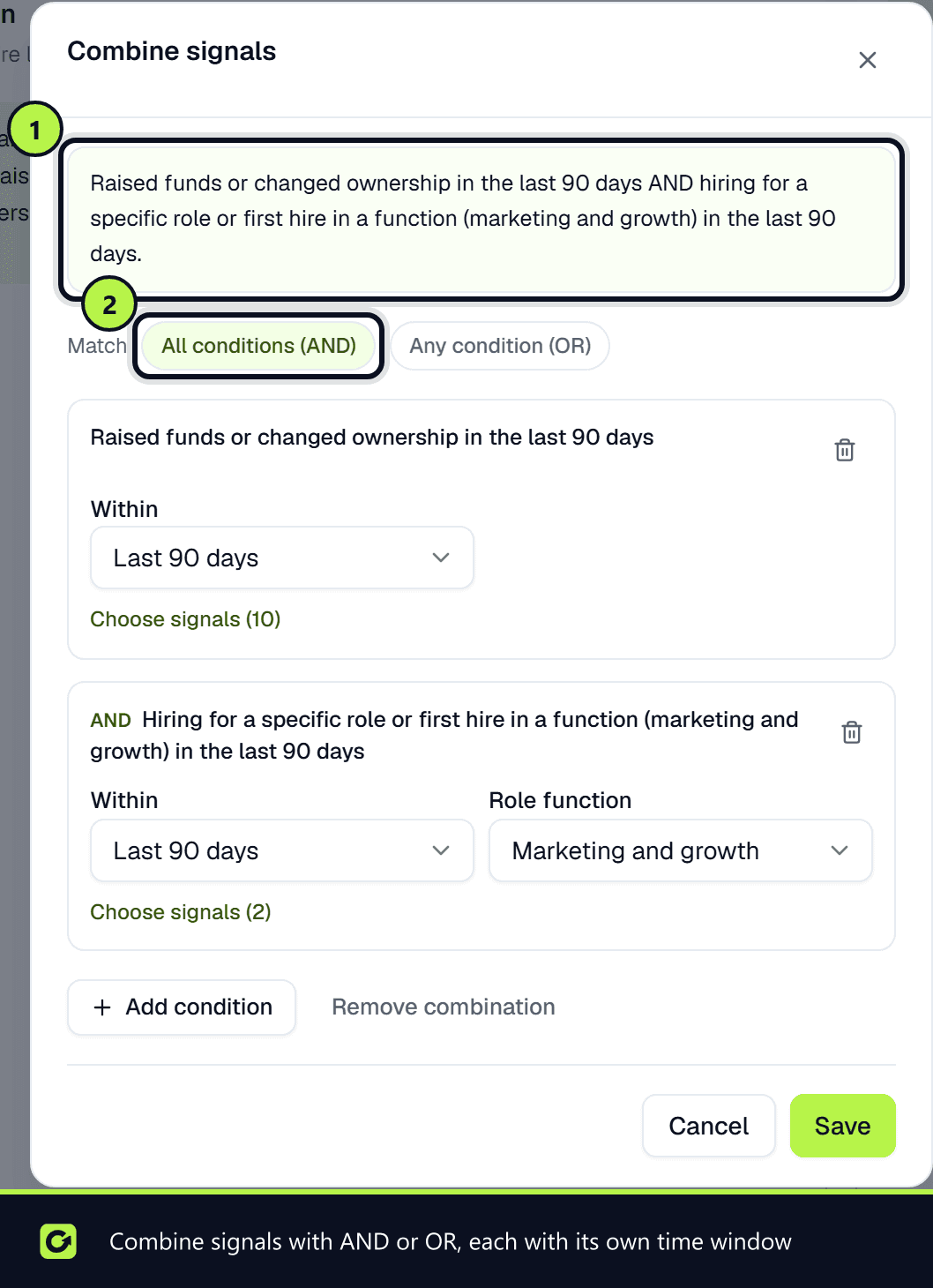
Use the Combination row of the plan to require more than one signal, for example "raised funds in the last 90 days AND hiring for a marketing role in the last 90 days".
- Step 1: Choose the Combination row.
- Step 2: Start from a common combination, or choose Build a combination.
- Step 3: For each condition, choose the signals that satisfy it, how recent they must be, and a role function where it applies.
- Step 4: Choose All conditions (AND) or Any condition (OR).
The sentence at the top of the editor is the combination in plain English. When a run finishes, only prospects whose evidence matches the combination are marked ready. The rest are kept, but not marked ready.
Intent categories and monitors
Your intent categories can start from a signal. In Find Leads → Intent, choose New intent category, then Or start from a buying signal. The category is named after the signal and collects it in every search that uses it. The monitor builder shows which signals the category you pick collects, and which of them cannot run yet.
Why this lead
Every signal records what was seen, where (a page URL or a Companies House page), the date and the text that matched. Open a prospect to see these under Why this lead.
Related
Screenshots
Still stuck?
Customers can raise a ticket from the help button inside the app. Not a customer yet? Talk to us.