
Qualifying
Your qualification policy
Set what must be known before booking or a sale, what is never asked, what disqualifies a lead and when a person takes over, for the whole workspace or for one offer
3 min readUpdated 27 September 2026
The qualification policy tells the assistant what it must know before each next step, what it must never ask, and when a person takes over. You set it once for the whole workspace, then tighten it for any offer that needs different rules.
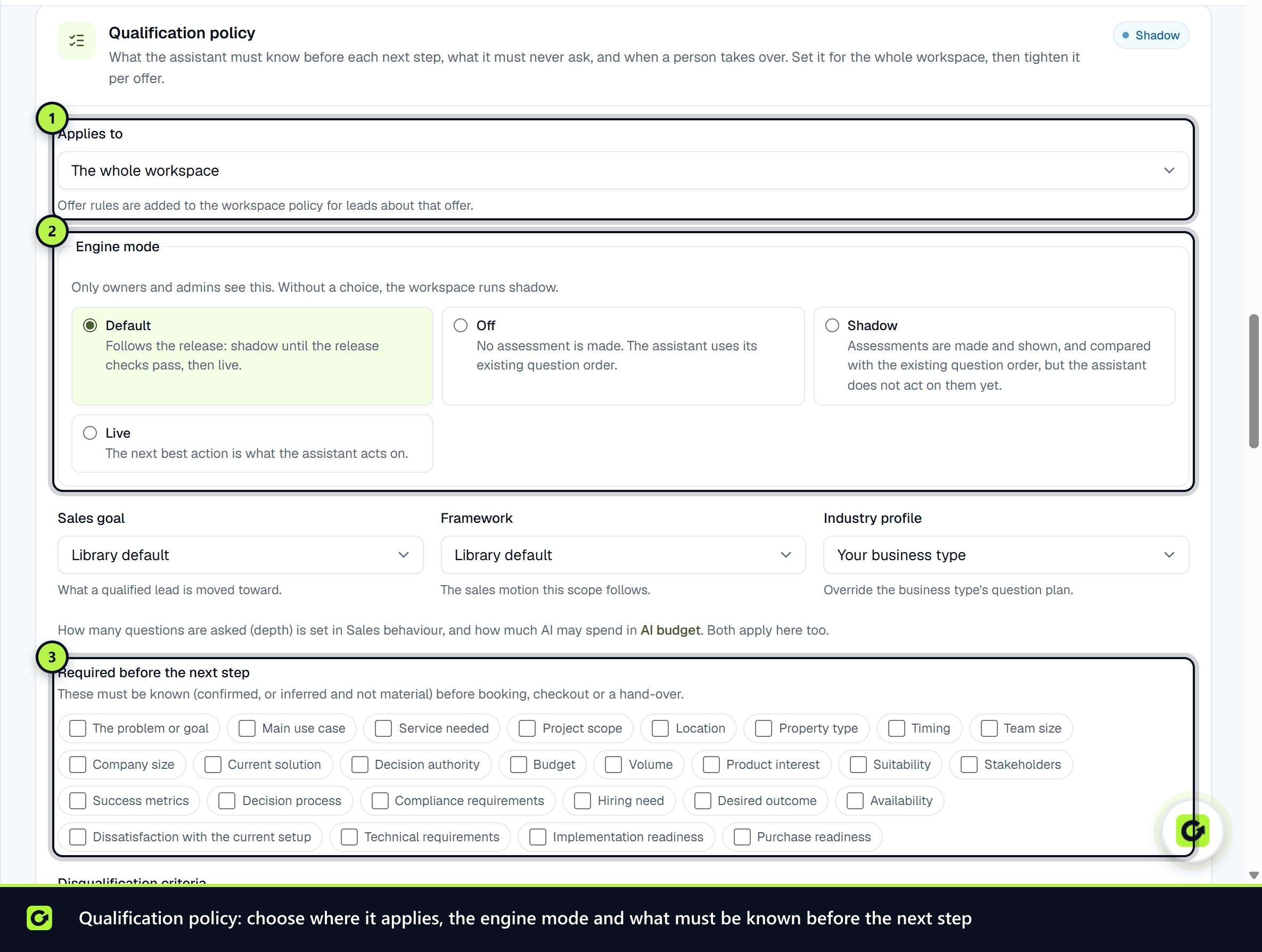
Open Settings → AI & selling and find the Qualification policy card. Owners and admins can change it; everyone else sees it read-only.
Workspace or one offer
Use Applies to to choose The whole workspace or one of your services. An offer's rules are added to the workspace policy for leads about that offer. The offer's own profile is summarised above its rules.
What you can set
| Setting | What it does |
|---|---|
| Sales goal | What a qualified lead is moved toward: book a meeting, a direct sale, a sign-up, a hand-over to a closer, and so on |
| Framework | The sales motion this scope follows |
| Industry profile | Use another business type's question plan |
| Required before the next step | Details that must be known before booking, checkout or a hand-over |
| Disqualification criteria | A detail and a value that rule a lead out, with the reason |
| Thresholds | The intent and how much must be known before a meeting, a direct close or a hand-over is offered |
| Autonomy | A cap on the assistant's own mode. It can only lower it, never raise it |
| Hand to a closer above | Deals above this value close with a person: the assistant qualifies the lead and books the meeting with them, and the meeting carries the lead brief |
| Escalate to a person when | Conditions that always bring a person in |
| Never ask / Also ask | Question keys, one per line, like BUDGET.RANGE |
How many questions are asked is set by Qualification depth in the Sales behaviour card, and how many AI credits it may use in the AI credits card. Both apply alongside the policy.
Your own questions
Your own questions are edited in Follow-Up → Qualification. Open a published question's menu and choose Map to a detail to say which detail it answers. Its answers then count toward that detail on each lead. Your rules still decide Qualified or Not qualified from those answers.
Changes made by Copilot or an assistant
Copilot and connected assistants can only make the policy stricter: forbid a question, require a detail, add an escalation condition or a disqualifier, or lower the autonomy cap. For example, you can ask Copilot "don't ask about budget for these leads" or "require the number of employees before booking for our managed IT offer". Anything that loosens the policy, changes a threshold or the goal, or changes the engine mode is done here in Settings.
Every change is recorded in the audit log with what it was before and after.
Engine mode
Owners and admins also see Engine mode: Off, Shadow or Live. See The next best action for what each means. Without a choice, the workspace follows the release default.
When changes apply
Each lead picks the policy up the next time it is assessed: when it replies, books or is re-run. Nothing is reassessed in bulk.
If the subscription is inactive, the policy is shown as saved but cannot be changed.
Related
Screenshots
Still stuck?
Customers can raise a ticket from the help button inside the app. Not a customer yet? Talk to us.