
Qualifying
Lead scoring explained
The seven things a lead score is built from, what grades A to D mean, how to read "Why this score", when a lead is re-scored, and what a score never uses
3 min readUpdated 27 September 2026
Every lead gets a score from 0 to 100 and a grade. The score is worked out by fixed arithmetic from facts on record, so the same facts always give the same score. It is not produced by AI, and every point can be traced to a fact.
The seven dimensions
| Dimension | What it measures | Examples of evidence |
|---|---|---|
| Fit | How closely they match your ideal customer | Industry, company size, location, service, incorporated company |
| Intent | How strongly they want to buy | Enquired themselves, positive reply, asked to book, asked about pricing |
| Need | Whether they have a need you meet | Stated need, qualification result |
| Commercial | What the deal could be worth | Estimated value, budget confirmed |
| Decision access | Whether you are talking to the person who decides | Role, decision authority confirmed, stakeholders known |
| Timing | How soon | Timeline, urgency, booking scheduled |
| Engagement | How engaged they are | Replied, number of messages, how recently |
The default weighting is Fit 30, Intent 20, Need 15, Commercial 10, Decision access 10, Timing 10 and Engagement 5. The weights shift with your Business type and sales motion in Settings → AI & selling → Sales behaviour. See Industry scoring and archetypes.
Grades
| Grade | Score |
|---|---|
| A | 80 or more |
| B | 60 to 79 |
| C | 40 to 59 |
| D | Below 40 |
Unknown counts as nothing, not as neutral
A dimension with no evidence scores zero and is listed as missing. The score is not stretched to fill the gaps, so a lead known on only two of the seven dimensions cannot reach grade A. The missing list is also what qualification asks about next, which is how a thin score fills in over time.
Negative facts cap a dimension
Some facts limit a dimension, however strong the other evidence is:
- Opted out: intent, engagement and timing drop to zero.
- Said not interested: intent drops to zero and timing is capped low.
- Asked to wait: timing is capped.
- Missed a booking: engagement is capped.
- Not qualified by your rules: need is capped.
Reading "Why this score"
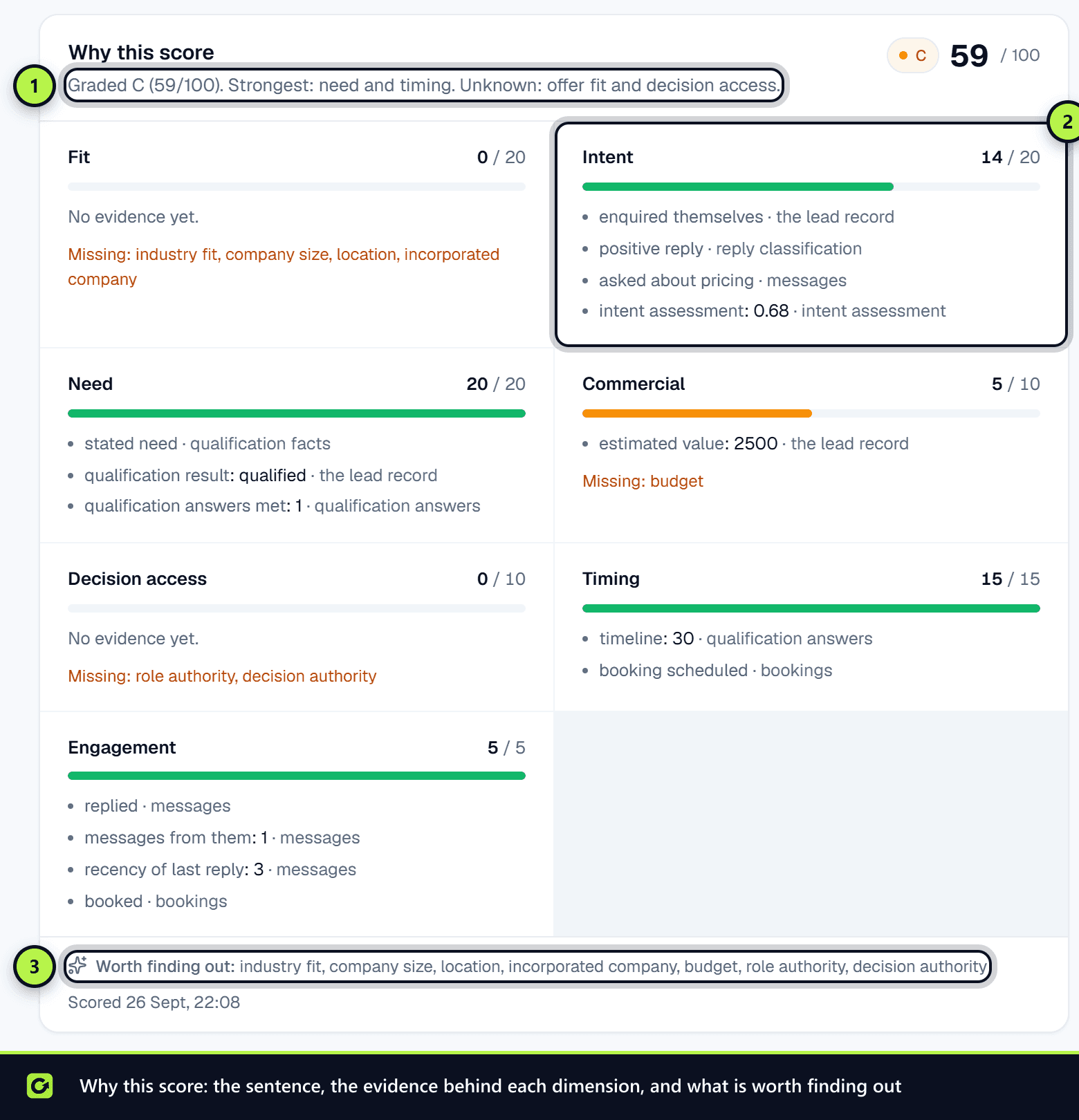
Open the lead. The Why this score panel shows:
- a one-sentence explanation,
- the grade and total,
- one bar per dimension, with the evidence behind it and anything Missing,
- when it was scored.
The Score history tab lists every past score, so you can see how and why it changed.
When a lead is re-scored
A lead is scored when it first arrives, and again automatically when:
- a new touch is recorded (for example, they come in through another source),
- a reply is classified,
- a qualification question is answered,
- a meeting is booked, requested, cancelled or missed,
- they unsubscribe or are suppressed.
To re-score by hand, choose Actions → Re-score on the lead.
What a score never uses
A score can only use features on a fixed allow-list. Anything that looks like a protected characteristic or special-category data is refused outright, including age, sex or gender, pregnancy, marital status, race or ethnicity, nationality, religion or belief, health or disability, sexual orientation, political opinions, trade union membership, genetic or biometric data, and criminal records. Names, email addresses and phone numbers are not features either.
A person can ask for an automated decision about them, such as a score or a qualification result, to be reviewed by a human. Log it as a Challenge an automated decision privacy request. See Data rights.
Related
Screenshots
Still stuck?
Customers can raise a ticket from the help button inside the app. Not a customer yet? Talk to us.