
Developers
Webhooks: being told the moment something happens
The event catalogue, the payload envelope, how to verify the signature, and how retries and failures work
4 min readUpdated 27 September 2026
A webhook endpoint is an HTTPS address on your server that ClientTurn POSTs to whenever an event you subscribed to happens. To add one, follow Setting up a webhook.
The request
Every delivery is a POST with a JSON body and these headers:
| Header | Value |
|---|---|
content-type | application/json |
clientturn-signature | t=<unix seconds>,v1=<hex signature> |
clientturn-event-id | The event's ID, stable across retries |
clientturn-event-type | For example lead.created |
clientturn-delivery-attempt | 1 for the first attempt, then 2, 3… |
The body is always the same envelope:
{
  "id": "4f0c…",
  "type": "meeting.booked",
  "created_at": "2026-09-26T09:14:03.120Z",
  "data": { … }
}
Verify the signature
The signature is an HMAC-SHA256, using your endpoint's signing secret, of the timestamp, a full stop, and the raw request body. A Node.js example:
import { createHmac, timingSafeEqual } from "node:crypto";

export function verify(rawBody, header, secret, toleranceSeconds = 300) {
  if (!header) return false;
  let t = null;
  const candidates = [];
  for (const part of header.split(",")) {
    const [key, value] = part.split("=", 2);
    if (key === "t") t = Number(value);
    if (key === "v1") candidates.push(value);
  }
  if (!Number.isFinite(t) || candidates.length === 0) return false;
  if (Math.abs(Date.now() / 1000 - t) > toleranceSeconds) return false;

  const expected = Buffer.from(
    createHmac("sha256", secret).update(`${t}.${rawBody}`).digest("hex"),
  );
  return candidates.some((candidate) => {
    const offered = Buffer.from(candidate);
    return offered.length === expected.length && timingSafeEqual(offered, expected);
  });
}
The event catalogue
An event appears here only if ClientTurn actually sends it.
| Type | Sent when |
|---|---|
lead.created | A new lead arrived from any source |
lead.touched | Someone who is already a lead enquired again and was matched, not duplicated |
lead.qualified | A lead finished qualification. Carries the outcome and the answers |
lead.status_changed | A lead moved status, whoever moved it: a person, Copilot, an agent or your own software |
lead.handover_required | Follow-up stopped and a person is needed |
lead.scored | A lead received a new score |
score.changed | A new score moved the lead to a different grade (A to D) |
message.received | An inbound message arrived on any channel |
reply.received | A lead replied, once per inbound message |
booking.created | An appointment was booked |
meeting.booked | A meeting was confirmed by a calendar or a person |
meeting.pending | A lead chose a time no calendar could confirm; it waits for someone to confirm or decline |
meeting.cancelled | A booked or requested meeting was cancelled |
meeting.no_show | A meeting was marked as a no-show |
contact.unsubscribed | A person opted out, on one channel or all of them |
contact.suppressed | An address or number was blocked for another reason: a bounce, a complaint, an invalid number or a manual block |
opportunity.created | A lead became a sales opportunity. Carries the lead, the starting stage and the sales motion |
opportunity.won | An opportunity was closed as won. Carries the lead and the reason given |
opportunity.lost | An opportunity was closed as lost. Carries the lead and the reason given |
ai.escalated | The conversation assistant handed a lead to a person, or asked a person for help in the background while it keeps the conversation (an assist request, such as confirming a price or the brief for a booked meeting). Read the hand-over in the app to tell which |
What data contains
For the events delivered through ClientTurn's event outbox, data also carries subject_type, subject_id and occurred_at.
| Type | Fields in data |
|---|---|
lead.touched | lead_id, touch_id, outcome (MERGED or SUPPRESSED), source_type, source, contact fields |
lead.scored, score.changed | lead_id, score_id, total, grade, previous_grade, confidence, trigger_event, scoring_version |
reply.received | message_id, lead_id, channel, classification (often null when the reply first arrives) |
meeting.* | booking_id, lead_id, provider, status, previous_status, starts_at, ends_at |
contact.unsubscribed, contact.suppressed | lead_id (when the address belongs to a lead), suppression_id, channel (ALL or one channel), reason, source |
opportunity.created | lead_id, stage, motion |
opportunity.won, opportunity.lost | lead_id, reason |
ai.escalated | handoff_id, lead_id, conversation_id, reason, priority |
The Test button sends a separate event type, endpoint.test, never a fake lead.created, so your handler can tell a drill from the real thing.
Handling duplicates
Use the event id (also in clientturn-event-id) to make your handler idempotent. It is the same on every retry, and the same event is never queued twice for one endpoint.
Retries and failures
- Answer with any
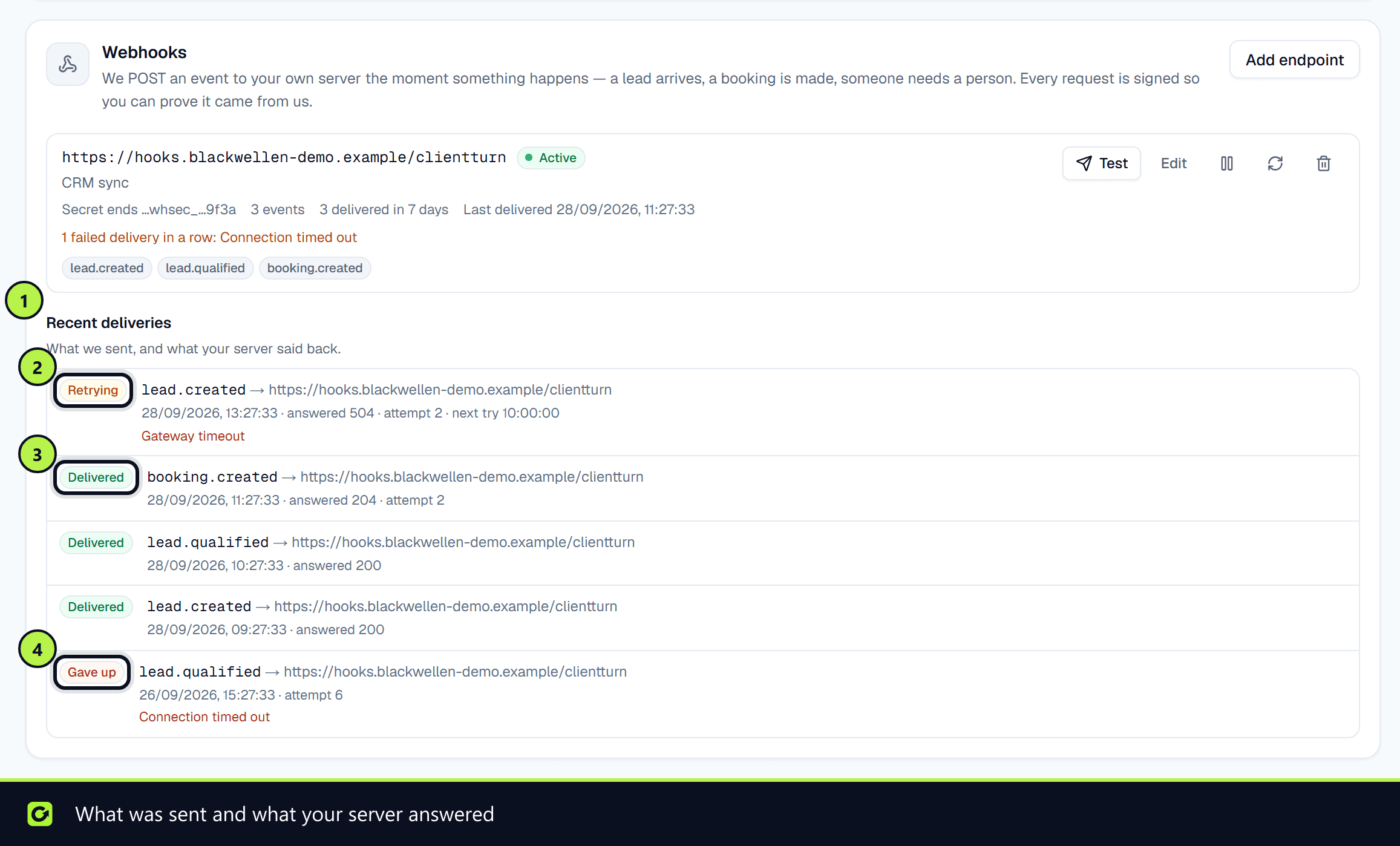
2xxwithin 10 seconds to acknowledge. - A failed delivery is retried up to six more times, after 30 seconds, 5 minutes, 30 minutes, 2 hours, 8 hours and 12 hours: seven attempts in all, over about 22.6 hours. While it is waiting for the next attempt, the delivery shows Retrying. After the last attempt it is marked Gave up.
- A
4xxanswer is not retried, except408and429, because repeating a request your server rejected will not change the answer. - Redirects are not followed. Point the endpoint at the final address.
- After 20 failed deliveries in a row, the endpoint is switched off automatically and marked Disabled, with the reason. Fix the problem and switch it back on.
The Recent deliveries log under your endpoints shows each delivery's status (Queued, Retrying, Delivered, Gave up or Cancelled), what was sent, what your server answered and when the next attempt is due. Your own software can read the same log with GET /api/v1/events.
The signing secret
The secret starts whsec_ and is shown once, when you create the endpoint and when you rotate it. Rotating takes effect immediately with no overlap, so update your server at the same time.
Related
Screenshots
Still stuck?
Customers can raise a ticket from the help button inside the app. Not a customer yet? Talk to us.