
Compliance
Compliance overview
How ClientTurn applies UK GDPR and PECR to every message, what it checks at the moment of sending, and what you need to set up
4 min readUpdated 27 September 2026
ClientTurn is built for UK businesses selling to other businesses. The rules that matter most are UK GDPR, which covers the personal data you hold, and PECR, which covers electronic marketing by email, SMS and social message. ClientTurn applies them as fixed rules, checked before every message. It does not rely on AI to judge them, and a rule it refuses cannot be overridden by AI.
For a plain-English summary you can share with your team or your own customers, see How we keep you compliant.
What is checked before every message
Each message is checked at the moment it is sent, not when it was scheduled, so a change since then (an opt-out, for example) is always respected.
| Check | What it means |
|---|---|
| Suppression | Anyone who opted out, bounced or was suppressed is never contacted. See Suppression, STOP and unsubscribe |
| Where the data came from | Cold contact needs a recorded, permitted source. A record with no known source goes to a person to decide |
| Channel | Cold outreach is email only. SMS and WhatsApp are only for people who gave you their number |
| Who the recipient is | Companies and LLPs can receive cold business email. Sole traders, ordinary partnerships and individuals cannot. See Corporate and individual subscribers |
| Consent and relationship | What your relationship with the person allows. See Consent and WhatsApp opt-in |
| Platform rules | WhatsApp opt-in and its 24-hour window; Instagram and Messenger reply windows. See LinkedIn and social messages |
| Quiet hours | Automated messages wait until quiet hours end |
| Source disclosure | A cold first contact must say where you got the person's details. See Telling people where you got their details |
| Unsubscribe | Marketing email carries an unsubscribe link and a one-click unsubscribe header |
A check can allow the message, block it, or hold it for a person to decide. A blocked or held message is never sent silently, and the reason is recorded on it.
What you need to set up
- Step 1: Open Settings → Data Controls.
- Step 2: Under Organisation, enter your Legal name, Registered address, Registered country, Privacy contact and Privacy notice URL.
- Step 3: Under Markets, choose the countries you prospect into.
- Step 4: Under Data sources, choose where prospect data may come from. Nothing is permitted until you choose.
- Step 5: Under Basis for contacting people, state what makes your outreach lawful. If you rely on legitimate interests, summarise your assessment in the Note.
- Step 6: Choose Save data controls.
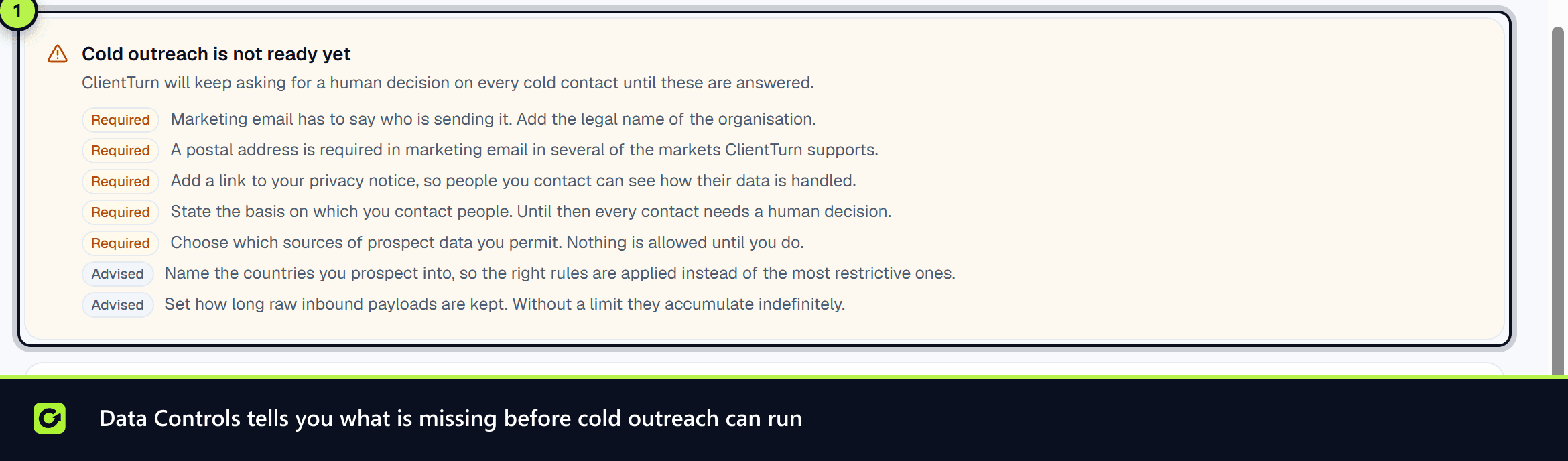
The panel at the top then shows Ready for cold outreach, or Cold outreach is not ready yet with what is missing. Until it is ready, every cold contact waits for a person's decision.
Set quiet hours in Follow-Up with Hold automated messages during quiet hours.
How cautious to be
Settings → Data Controls → How cautious to be decides what happens to a prospect that is neither clearly allowed nor clearly refused:
- Only confirmed companies: contact only people the company register confirms work at an incorporated company, with an address on that company's own domain. Anything unclear is dropped.
- Ask me about anything unclear: unclear records are held for you to decide. This is the default behaviour.
- Contact on my stated basis: unclear records may be contacted on the basis you stated. Anything the rules refuse is still refused.
Evidence
Every send records the decision that allowed it, the rules in force at the time and the facts it relied on. Settings → Data Controls → Evidence you can produce shows the last 30 days of decisions and the rule versions currently in force. A past decision is kept with the rule version that made it, so you can explain it later against the rules that applied then.
People's rights over their data
You can export, suppress, restrict, anonymise or erase a lead, log privacy requests with their deadlines, and set automatic retention. See Data rights.
Automated decisions and scores
Lead scores and qualification outcomes are worked out by fixed, explainable rules, and every score shows why. Protected characteristics are never used. A person can ask for an automated decision about them to be reviewed through a privacy request. See Lead scoring explained.
Related
- Data Controls settings
- Consent and WhatsApp opt-in
- Suppression, STOP and unsubscribe
- Cold email that gets replies (and stays legal)
- Reaching the decision maker
- LinkedIn, Instagram, Messenger and TikTok conversations
- How we keep you compliant
Screenshots
Still stuck?
Customers can raise a ticket from the help button inside the app. Not a customer yet? Talk to us.