
Developers
MCP tools and approvals
Which tools an AI assistant gets over MCP, which ones run straight away, which wait for a person, and how to approve or refuse them
2 min readUpdated 26 September 2026
Over MCP, an assistant is offered the same operations the ClientTurn app uses, with the same rules. Tool names follow the pattern area.action, for example lead.get or agent.pause.
Which tools it sees
A tool is listed only if both:
- the key has the tool's permission (scope), and
- the key's owner currently has the tool's minimum role.
So an assistant with only leads:read sees the lead read tools and nothing else.
What the tools cover
| Area | Examples |
|---|---|
| Leads | lead.get, lead.search, lead.update, lead.assign, lead.set_status, lead.add_note, lead.flag_attention, lead.archive, lead.restore, lead.score_explain, lead.contactability, lead.rescore, lead.takeover, lead.resume_follow_up |
| Adding a lead | create_lead, for warm leads only. See Leads from MCP |
| Messages | message.draft (writes a draft for a person to review), message.send |
| Deals and bookings | opportunity.list, opportunity.get, opportunity.set_stage, opportunity.close, booking.list, booking.get, booking.set_status |
| Prospects | prospect.search, prospect.get, prospect.approve, prospect.reject |
| Campaigns | campaign.list, campaign.get, campaign.pause, campaign.resume, campaign.launch, campaign.add_lead |
| Agents | agent.list, agent.get, agent.create, agent.configure, agent.start, agent.run_now, agent.pause, agent.stop, agent.delete |
| Assistant and selling settings | ai_settings.get, ai_settings.update, sales_settings.get, sales_settings.update, ai_budget.update |
| Connections | connector.list, connector.get, connector.replay_event, connector.dismiss_event, connector.disconnect, crm_pull.list, crm_pull.set |
| Workspace | business.get_profile, business.get_status, analytics.summary, funnel.get, ai_usage.get, qualification.list_questions, member.list, meeting_type.list |
lead.get returns the lead together with recent_activity: its last 20 messages on any channel, newest first, so the assistant can see the conversation without a second call.
The exact list your assistant sees depends on its permissions and your role.
What runs straight away, and what waits
| Kind of action | Runs | Examples |
|---|---|---|
| Reading | Immediately | Every list and get |
| Safe or reversible changes | Immediately, and audited | lead.add_note, lead.set_status, agent.create, agent.configure, agent.pause, agent.stop |
| Contacting someone outside the workspace | Waits for a person | message.send, campaign.launch, campaign.resume, opportunity.close, member.invite |
| Spending money | Waits for a person | agent.start, agent.run_now |
| Hard to undo | Waits for a person | lead.archive, connector.disconnect, agent.delete, member.remove |
Pausing and stopping are never held for approval: the safe direction is always available at once.
Approve or refuse a request
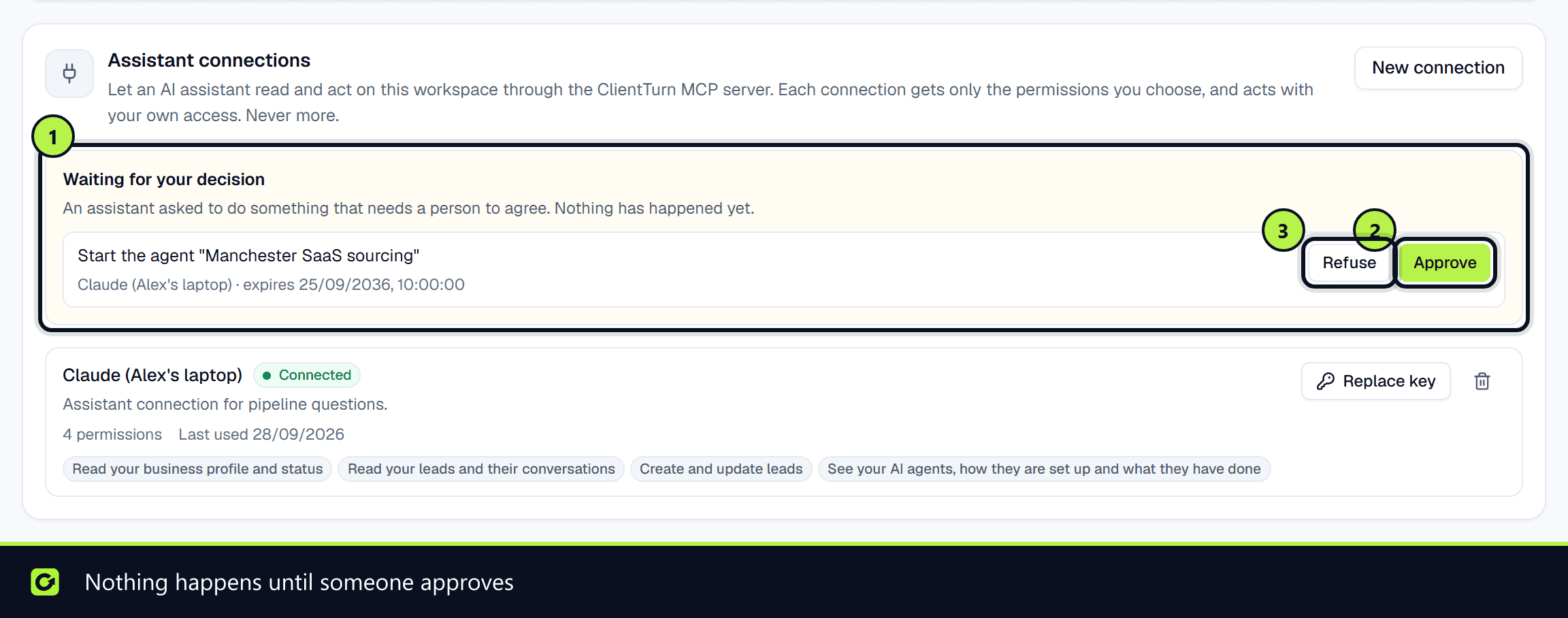
When an assistant asks for something that needs a person, nothing happens yet. The request appears in Settings → Developer, in the Assistant connections panel, under Waiting for your decision, with a plain-English summary, which assistant asked, and when the request expires.
- Step 1: Read the summary: what would happen, and to which record.
- Step 2: Choose Approve to run it, or Refuse to discard it.
Only owners and admins can decide. An approved request runs on your authority, not the assistant's, and runs once: approving twice cannot do it twice. The assistant was told the action had not happened, so it will not have reported success to you.
Audit
Every tool call is recorded with the credential that made it, including every refusal and every request that was parked for approval.
Related
Screenshots
Still stuck?
Customers can raise a ticket from the help button inside the app. Not a customer yet? Talk to us.