
Reactivation
Reactivating a CSV list
Upload a list of past contacts as a CSV, map the columns, fix invalid rows, and understand why imported contacts are treated more cautiously than people who contacted you
2 min readUpdated 26 September 2026
You can reactivate a list you hold outside ClientTurn, such as past enquiries exported from another system, by uploading it as a CSV file in the campaign builder.
Prepare the file
- Format:
.csv, up to 2MB and 5,000 rows. The first row must be the column headings. - Every row needs a way to reach the person: a mobile number, an email address, or both.
- Optional columns: first name, last name, service and a UK postcode.
- Service is matched to your services by name. Use the same names as in Settings → Workspace → Services.
SMS and WhatsApp campaigns reach the contacts with a mobile number. Email campaigns reach the ones with an email address.
Upload it
- Step 1: Open Reactivation and choose Create campaign.
- Step 2: Under Audience source, choose Import from CSV.
- Step 3: Choose Choose a file, or drag and drop the CSV.
- Step 4: Match your columns to the fields. Choose Not in this file for any field you do not have.
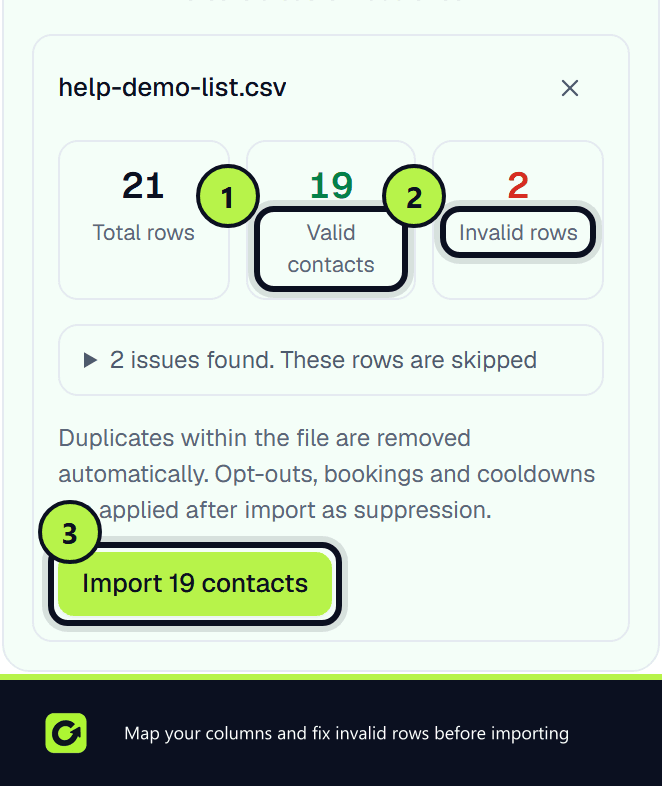
- Step 5: Choose Validate file. You see Total rows, Valid contacts and Invalid rows, with the reason for each invalid row.
- Step 6: Choose Import to add the valid contacts, then carry on with the campaign. See Reactivation overview.
Why a row is rejected
- It has no mobile number and no email.
- The phone number is not a usable mobile, and there is no email either.
- The email or UK postcode is not valid.
- It duplicates an earlier row in the same file.
What importing does
- Each contact becomes a lead in ClientTurn, recorded as imported from your list. A contact who is already a lead is matched to the existing record.
- Imported contacts do not start the new-lead follow-up sequence. They are only contacted by the campaign.
- Suppression rules still apply on top of your list.
Imported contacts are treated cautiously
A list you upload is not evidence that each person agreed to hear from you. So, for anyone who is not a confirmed company (a sole trader, an individual, or someone whose type is unknown), a marketing message needs one of these on record:
- they contacted you or asked for information,
- they are an existing customer,
- you have evidence of their consent.
Without one, the message is not sent, and the reason is recorded on it. Contacts who were already leads keep the relationship they had, so someone who originally enquired can still be contacted.
Related
Screenshots
Still stuck?
Customers can raise a ticket from the help button inside the app. Not a customer yet? Talk to us.