
Reactivation
SMS reactivation
Send a reactivation campaign by text, with how segments are counted and charged, the automatic opt-out line, quiet hours, daily limits and what happens when your SMS allowance runs out
3 min readUpdated 27 September 2026
SMS is the most direct reactivation channel for leads who gave you their mobile number. This guide covers what is specific to text messages. For the campaign builder itself, see Reactivation overview.
Before you start
- Connect an SMS number in Settings → Connections (Twilio SMS). You cannot launch an SMS campaign without one.
- SMS goes only to people who gave you their mobile number, for example on a lead form. ClientTurn never uses SMS for cold contact.
Segments: how texts are counted
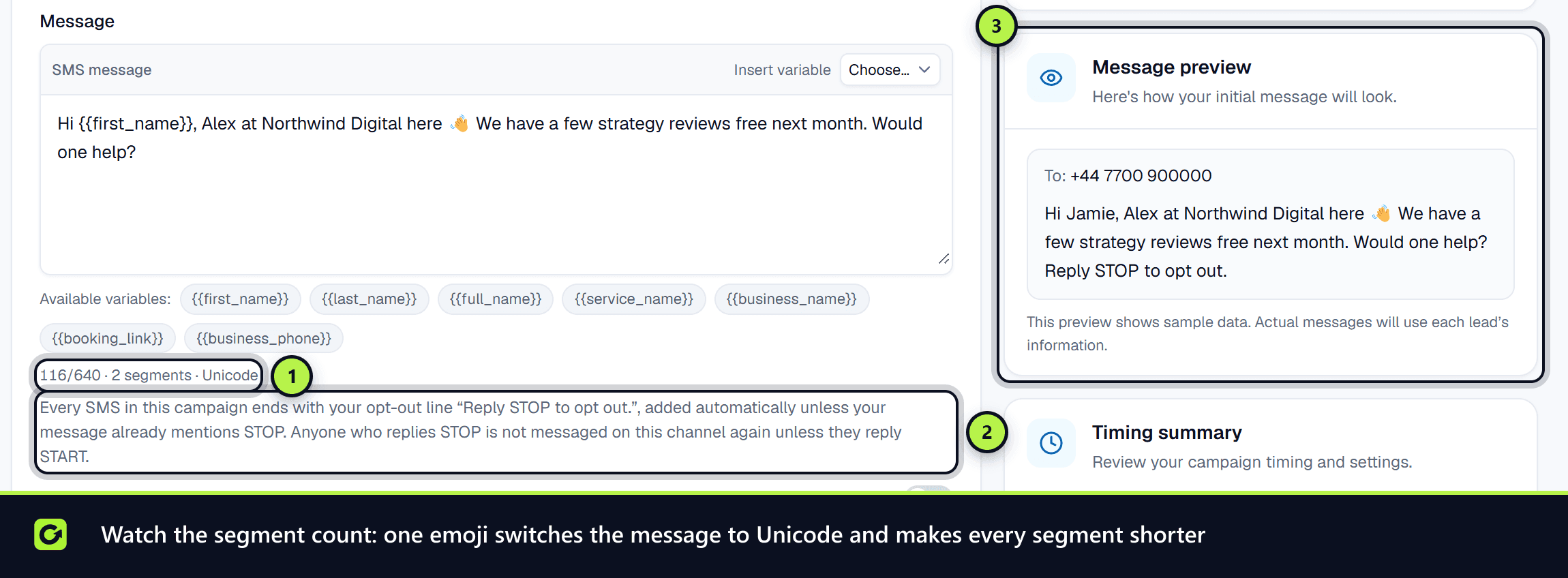
Your SMS allowance and top-up credits are counted in segments, not messages. The builder shows the number of segments as you type.
| Message contains | One segment holds | Each segment of a longer message holds |
|---|---|---|
| Only standard characters | 160 characters | 153 characters |
| Any emoji, curly quote or other special character | 70 characters | 67 characters |
One emoji switches the whole message to the smaller size. The characters € [ ] { } \ ~ ^ | count as two. A message can be up to 640 characters.
The Launch estimate on the review step shows how many messages the campaign will send.
The opt-out line
Every SMS in a campaign ends with your opt-out wording, for example "Reply STOP to opt out", unless your message already mentions STOP. It is added automatically and counts towards the segments. Someone who replies STOP is not texted again. See Suppression, STOP and unsubscribe.
If your SMS sender is a name rather than a number, people cannot reply to it, so a message from it needs another way to opt out, such as a link. Without one, it is not sent.
When messages go out
- Quiet hours: texts are not sent overnight. They wait until the next permitted time, both under ClientTurn's contact rules and your own quiet hours in Settings → Workspace.
- Daily sending limits: campaign texts count towards your daily SMS limit. Anything over it waits until the next day. See Usage and limits.
Email first for leads who have not engaged
New SMS campaigns are cost-aware: a lead who has never replied gets the message by email from your connected mailbox when they have an address. Only leads with no usable email, and leads who have replied or shown real interest, are texted. This keeps most of your SMS allowance for conversations. Turn it off in the campaign builder to text everyone.
When your SMS allowance runs out
Each text uses your plan's monthly SMS allowance first, then any SMS credits you have bought. If none is left, the message is not sent, nothing is charged, and the reason is recorded on it. Buy a bundle in Settings → Billing & Usage to carry on. See Top-up credits for AI, SMS and WhatsApp.
Personalising with AI
Personalise each message with AI can rewrite each text for the lead. A rewrite that fails your style checks, is too long, or would exceed your AI credit limits is not used, and the lead gets your original message.
Related
- Reactivating existing leads
- Who reactivation will not contact
- Re-engagement check-ins, no-shows and win-back
- Plans and what each includes
Screenshots
Still stuck?
Customers can raise a ticket from the help button inside the app. Not a customer yet? Talk to us.