
Booking and sales
The handoff brief
When the assistant needs a person, either to take the conversation as a last resort or to help with one thing in the background, it prepares a brief of everything known about the lead, built only from recorded facts
5 min readUpdated 27 September 2026
The conversation assistant is built to carry the conversation itself: it answers, qualifies and books the meeting (or sends your approved checkout link) whenever it safely can. A person is brought in in one of two ways, and both come with a brief: what you need to know without reading every message.
| What happens | Who has the conversation | |
|---|---|---|
| Hand-over | The conversation passes to your team and the assistant stops replying. The lead gets a short, honest acknowledgement. | Your team |
| Assist request | You are asked to do one thing in the background, such as confirm a price or send security documents. The lead is told a colleague will confirm that detail, and the assistant keeps the conversation going. | The assistant |
When the assistant hands over
A hand-over is the last resort. It happens only when:
| Reason | Priority |
|---|---|
| The lead complained, made a legal threat, or it is an emergency | Urgent |
| The lead asked to speak to a person | High |
| A booking or checkout connection failed and could not be retried | High |
| The lead made a data-rights or privacy request, such as asking for a copy of their data | Normal |
| The lead asked for a commitment the assistant may not make: bespoke contract or payment terms, or a discount beyond what you approved after the assistant has already answered once | Normal |
| A legal, regulatory or contract-terms question came up | Normal |
| The assistant asked twice, in different words, and still could not get a usable answer | Normal |
| The assistant could not write a safe reply after three attempts | Normal |
| Your own settings say a person should take this case (for example Hand over when qualification needs review, which is off by default, or a rule in your qualification policy) | Normal |
| The AI credit limit for this conversation is used up | Normal |
"Are you a bot?" is not a hand-over. The assistant says plainly that it is your business's AI assistant, offers for a person to join if the lead would like, and carries on. It hands over only if the lead then asks for a person. It never claims or implies to be human.
When you get an assist request instead
The assistant keeps the conversation and asks you to help in the background when:
- a reply needs a person to check it: your rules marked the lead Review. The assistant keeps helping, but does not offer a booking or checkout until the review is cleared.
- the lead asked something your approved information does not answer, or asked about a price you have not published. The assistant tells them a colleague will confirm that detail and carries on with everything else.
- the lead needs security documents, a questionnaire or procurement paperwork.
- the lead is ready to buy but the assistant may not send a checkout link, so a colleague sends the details.
- your calendar has nothing free, so a colleague arranges a time.
When a reply does not match any of your answer options, the assistant asks again in other words, naming the options, up to twice. A price objection ("that's too expensive", "we need a better price") is handled by the objection library, not passed on.
The meeting is the hand-off
For deals that close through a person, such as an enterprise sale or a deal above your value limit, the assistant qualifies the lead and books the meeting with your team. The conversation is not taken away from it before then. When the meeting is booked, a Meeting booked assist request carries the brief, so the person taking the meeting has everything the lead has already said.
What is in the brief
The Lead brief is built only from what ClientTurn has recorded. Nothing in it is written by AI:
- the lead's score and grade, and why,
- their tags,
- the answers they gave, with any inferred answers marked (inferred),
- objections they raised,
- anything your business has already promised them,
- what is still unknown,
- the meeting, if one is booked or requested,
- a recommended approach for your sales motion.
Above it is a 30-second brief: a few sentences summarising the lead. AI writes it from the recorded brief only, never from the raw conversation. It is then checked: if it mentions any number, date or name that is not in the recorded brief, it is thrown away and a plain summary built from the facts is used instead. You can trust that nothing in it was invented.
Where to find it
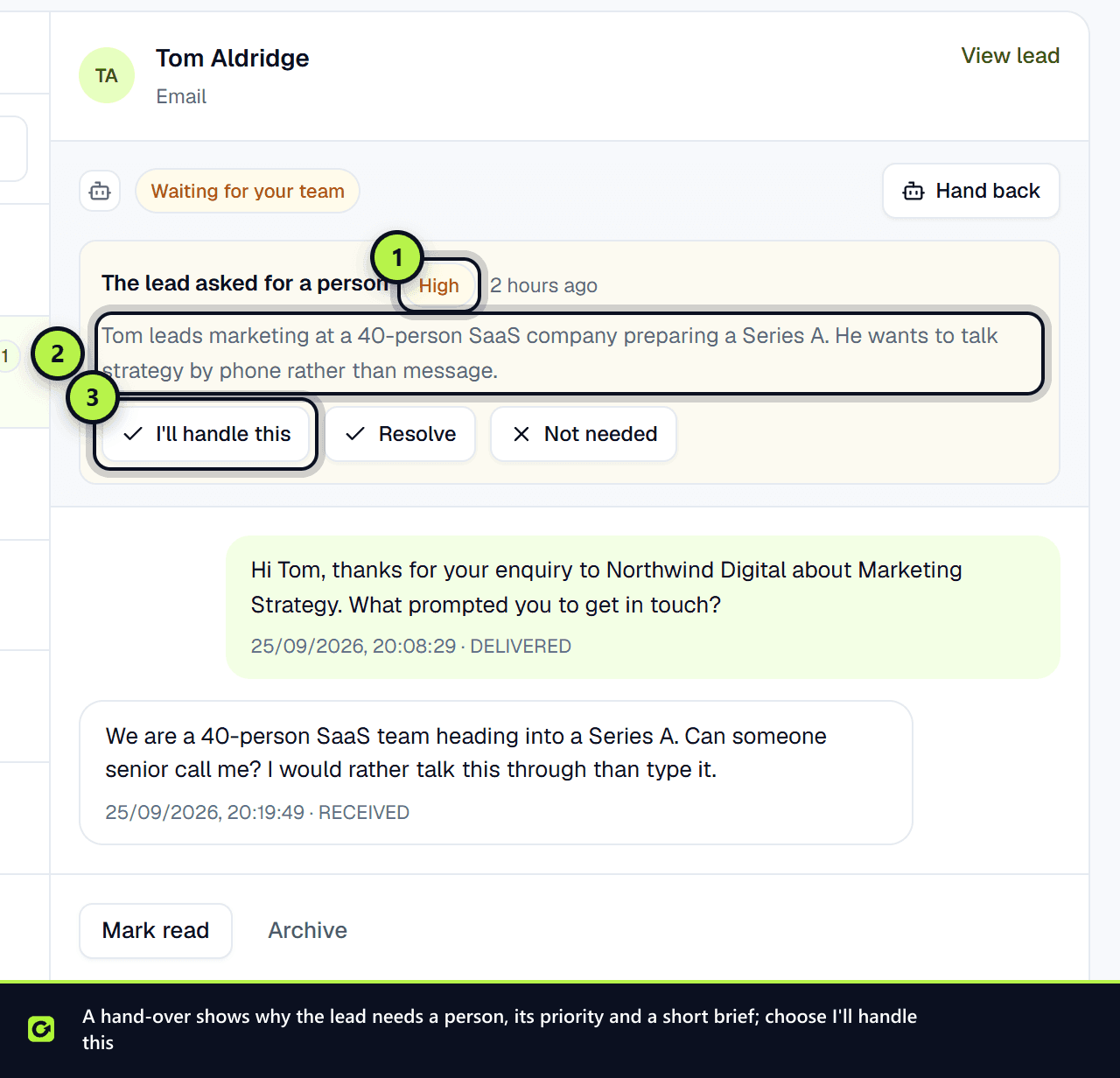
Open the conversation in the Inbox. The assistant panel shows the hand-over or assist request, its priority, the 30-second brief and the Lead brief. An assist request is marked Assistant still replying. The lead page also shows it under Needs attention. You are told in the app, and in Slack if you have Slack alerts on. See Workspace settings.
If you have a connected CRM that accepts notes, the brief is also added to the contact there.
Dealing with a hand-over or an assist request
In the assistant panel:
- I'll handle this claims it for you.
- Resolve marks it dealt with, with an optional note of What was done?. For a hand-over, choose Resolve and keep it with me to keep replying yourself, or Resolve and hand back to return the conversation to the assistant. For an assist request the assistant already has the conversation, so Resolve and hand back simply closes the request.
- Not needed withdraws one that should not have been raised.
The assistant never takes a handed-over conversation back by itself. Only a person can hand it back. See Taking over a conversation.
Related
Screenshots
Still stuck?
Customers can raise a ticket from the help button inside the app. Not a customer yet? Talk to us.