
Integrations
Connecting Zapier
Start a Zap from a new lead, look a lead up, or update one, and send contacts into ClientTurn from any Zap
2 min readUpdated 27 September 2026
The ClientTurn app for Zapier (listed as "Client Turn") works through a workspace API key. It can start a Zap when a lead arrives, look a lead up, and update one.
Add the app
- Step 1: Add the Client Turn app to a Zap. While it is awaiting Zapier's public listing it is invite-only; workspaces are sent an invitation link by email after their first subscription payment. If you have not received one, contact support.
- Step 2: When Zapier asks you to connect an account, paste an API key. Create one in Settings → Developer → New key (owners and admins only). See API overview and authentication.
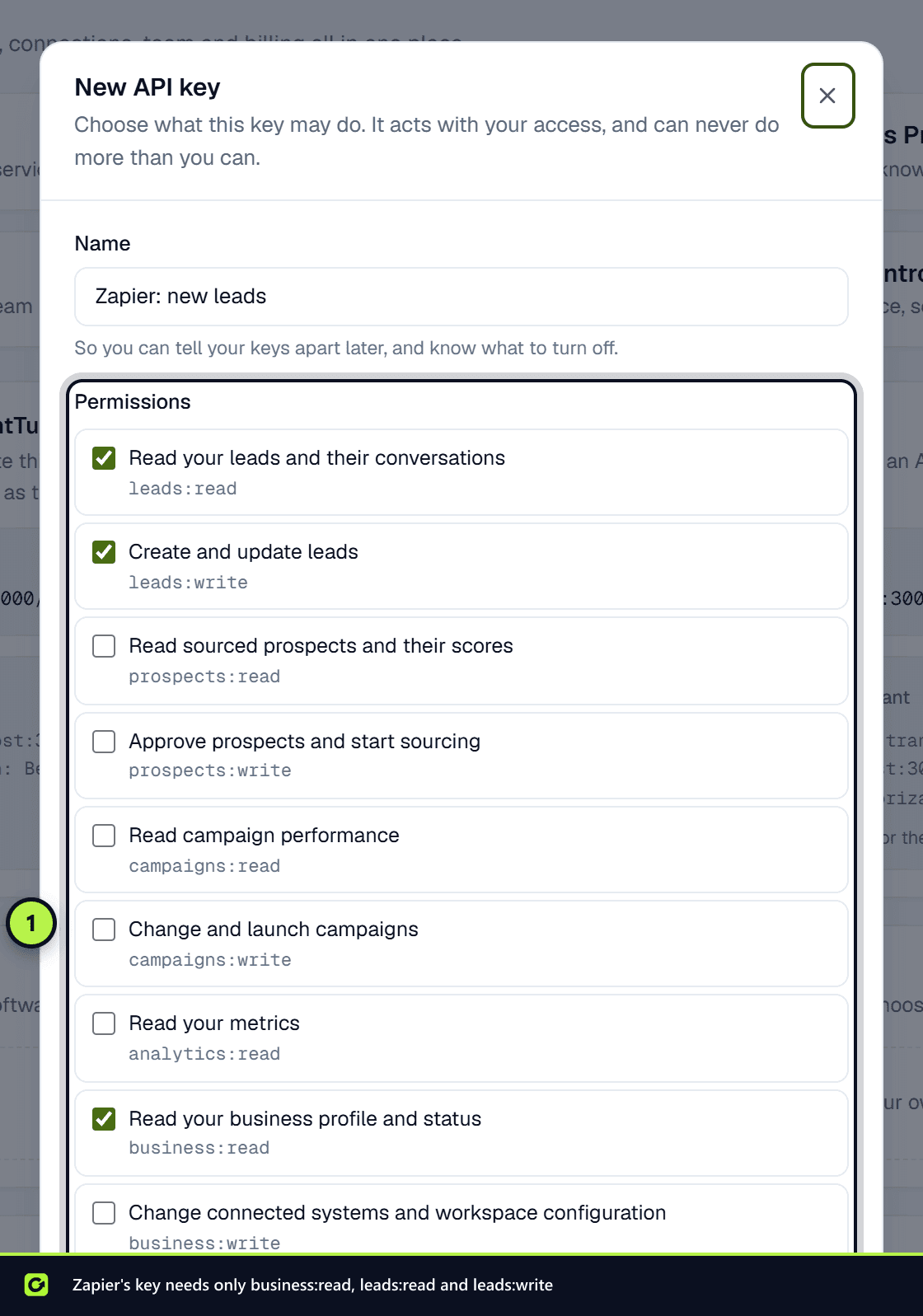
- Step 3: Give the key these permissions:
- Read your business profile and status (
business:read) — Zapier uses it to check the key when you connect. - Read your leads and their conversations (
leads:read) — for the trigger and the search. - Create and update leads (
leads:write) — only if you use the update action.
- Read your business profile and status (
Zapier can only do what the key allows, checked on every call. Revoking the key in Settings → Developer disconnects every Zap using it immediately.
New Lead (trigger)
A polling trigger: it starts a Zap for each lead that has appeared in your workspace since Zapier last checked. Zapier checks on a schedule set by your Zapier plan, so treat it as near real time rather than instant. Use it to post new leads to a chat tool, log them to a spreadsheet, or start any Zap that reacts to a new enquiry.
Find Lead (search)
A search step for the middle of a Zap: give it an email, a phone number or a name and it returns the matching lead, if there is one. Use it to check whether someone is already a lead before deciding what to do next.
Update Lead (action)
Changes an existing lead's status or adds a note, given its lead ID, usually the ID a New Lead trigger or a Find Lead search returned earlier in the same Zap. It changes the record directly and does not restart follow-up on its own.
Sending contacts into ClientTurn from a Zap
The Client Turn app has no "create lead" action yet. Use Zapier's built-in Webhooks by Zapier action (a paid Zapier feature) instead, pointed at one of two places:
| Send to | The contact becomes | Guide |
|---|---|---|
POST /api/v1/leads, with your API key and an Idempotency-Key header | A lead, deduplicated, with no follow-up started | Creating leads with the API |
| The Zapier inbound connection in Settings → Connections | A prospect in Find Leads, for review | Leads from Zapier and webhooks |
Use the API when the Zap is carrying a genuine enquiry (a form someone filled in). Use the inbound connection for contacts you have not yet decided to contact.
Related
- Webhooks, for instant notifications instead of polling
- Troubleshooting integrations
Screenshots
Still stuck?
Customers can raise a ticket from the help button inside the app. Not a customer yet? Talk to us.