
Finding leads
Bringing contacts in from Zapier, Pipedrive and webhooks
Post contacts from Zapier, Make, n8n, Pipedrive or your own system to a signed inbound endpoint, where they arrive in Find Leads for review
3 min readUpdated 26 September 2026
Any tool that can send an HTTP request can post contacts to ClientTurn. There are two destinations, and the difference matters:
| Destination | Contacts become | Use it when |
|---|---|---|
| An inbound contact connection (this article) | Prospects in Find Leads, for review | The tool holds contacts you have not yet decided to contact: a CRM segment, a list, a sign-up in another system |
The public API, POST /api/v1/leads | Leads, deduplicated, not auto-contacted | The contact is a genuine enquiry, such as a website form. See Leads from the API |
Create an inbound connection
- Step 1: Open Settings → Connections and scroll to Inbound contact connections.
- Step 2: Choose Set up on Zapier, Pipedrive or Custom webhook. They all create the same kind of endpoint; the name only helps you recognise it.
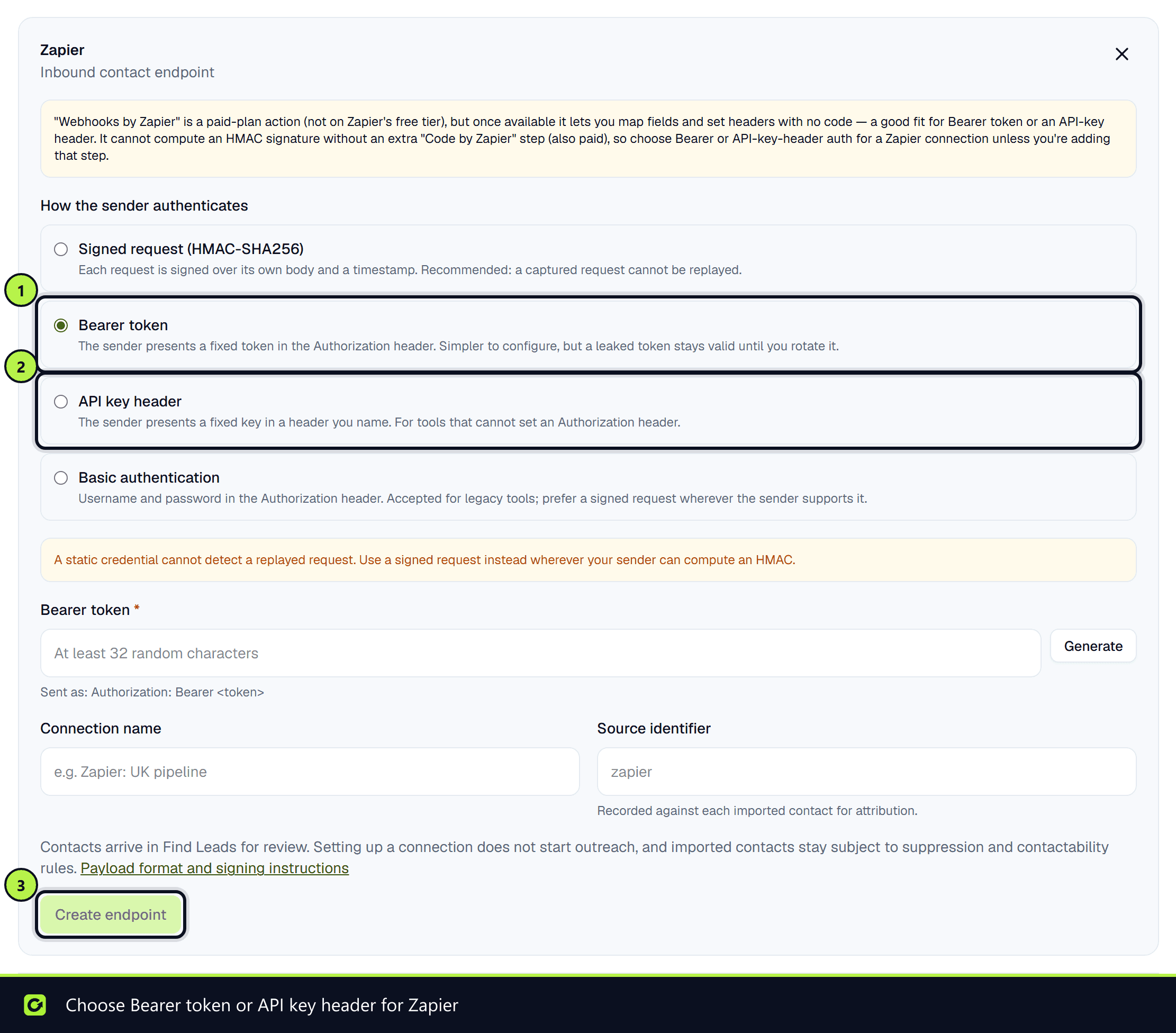
- Step 3: Choose How the sender authenticates:
- Signed request (HMAC-SHA256) — recommended. Each request is signed over its body and a timestamp, so a captured request cannot be replayed.
- Bearer token, API key header or Basic authentication — for tools that cannot compute a signature. Simpler, but a leaked credential works until you rotate it.
- Step 4: Generate or paste the secret, optionally give the connection a Connection name and Source identifier (used for attribution), and choose Create endpoint.
- Step 5: Copy Your endpoint URL into the other tool.
Only owners and admins can create or change a connection. The secret is stored encrypted and never shown again; to change it, choose Manage, then Save and rotate credentials.
What to send
One contact per request, as JSON, with Content-Type: application/json:
{
  "eventId": "your-system-id-12345",
  "eventType": "contact.created",
  "firstName": "Priya",
  "lastName": "Shah",
  "email": "priya@example.co.uk",
  "phone": "+447700900123",
  "company": "Example Studio Ltd"
}
eventIdis required and must be unique per contact event. A repeat of the sameeventIdis recognised and not imported twice.- You need an
emailor aphone. Phone numbers must be in international format, starting with+. - The body must be under 16 KB.
For a signed request, send the Unix timestamp in X-ClientTurn-Timestamp and, in X-ClientTurn-Signature, the hex HMAC-SHA256 of the timestamp, a full stop and the raw body, using your signing secret. Requests more than five minutes from the current time are refused.
A successful request is answered 202 with {"accepted": true, "status": "queued"}.
Zapier
"Webhooks by Zapier" can map fields and set headers without code, but it cannot compute an HMAC signature without an extra "Code by Zapier" step. Choose Bearer token or API key header for a Zapier connection unless you add that step. Both Webhooks by Zapier and Code by Zapier are on Zapier's paid plans.
Pipedrive
Pipedrive's own webhooks nest every field and send email and phone as arrays, which this endpoint rejects. Use Pipedrive's Automations builder (Advanced plan or above) with a raw JSON body to map each field to the flat shape above. See Connecting Pipedrive.
Checking it works
The connection's badge shows what has actually happened, not what was saved:
| Badge | Meaning |
|---|---|
| Configured | Endpoint created; no verified request has arrived yet |
| Healthy | Recent requests were verified and queued |
| Warning | Requests are arriving, but some were rejected |
| Failed | The most recent requests were all rejected |
Last accepted and Last rejected show when each last happened. A request that authenticated but had the wrong fields is kept so it can be retried once the mapping is fixed.
Related
Screenshots
Still stuck?
Customers can raise a ticket from the help button inside the app. Not a customer yet? Talk to us.